How to Use a GMT Bezel to Track a Third Time Zone (Step-by-Step)
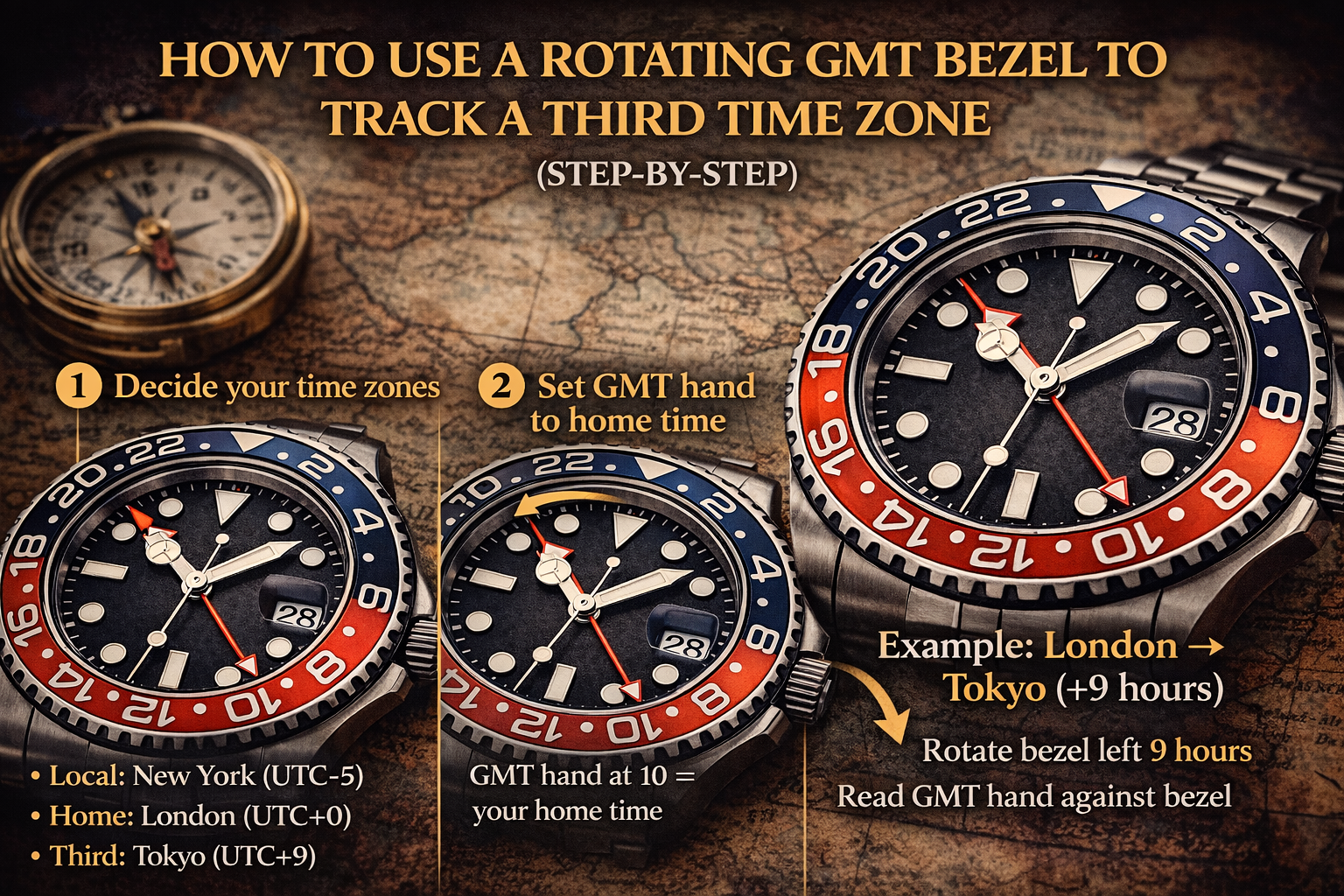 A GMT watch typically tracks two time zones (local + home) using an extra 24-hour hand. But if your watch has a rotating 24-hour bezel, you can track a third time zone by offsetting the bezel.
If you haven’t read the overview first, start here:
GMT vs World Time Explained: Differences, How They Work, and Which You Need
Quick Answer
-
Set your GMT hand to home time on the 24-hour scale
-
Keep the main hands on local time
-
Rotate the 24-hour bezel to align the bezel with your third time zone offset
-
Read the GMT hand against the bezel to get the third time zone
Before You Start: Confirm What Kind of GMT You Have
Some GMT watches are easier to use while traveling depending on whether you have a:
-
True/Traveler GMT (local hour hand jumps)
-
Office/Caller GMT (GMT hand jumps)
Read:
True GMT vs Office GMT: Differences, How to Tell, and How to Set Each One
https://www.globalwatchfair.com/blogs/true-gmt-vs-office-gmt
What You Need to Track a Third Time Zone
✅ A GMT hand (24-hour hand)
✅ A rotating 24-hour bezel (or rotating 24-hour ring)
✅ The time zone offset for City #3 (relative to UTC or your home time)
If your bezel is only a dive bezel (60-minute), you can’t use it the same way for 24-hour time zones.
Step-by-Step: Track a Third Time Zone Using the GMT Bezel
Step 1) Decide your time zones
Example:
-
Local: New York (UTC-5)
-
Home: London (UTC+0)
-
Third: Tokyo (UTC+9)
Step 2) Set GMT hand to home time
Set the GMT hand to your home time and keep it there.
Need safe setting habits?
How to Set an Automatic Watch Safely (Time, Date, and the “Danger Zone” Explained)
Step 3) Keep main hands on local time
Main hour/minute hands show local time.
Step 4) Rotate the bezel for the third time zone
Now rotate the bezel so the GMT hand points to the correct 24-hour time for your third zone.
Simpler method (offset method):
-
Calculate the difference between home and third time zone.
-
Rotate bezel by that many hours.
Example:
-
Home (London) → Third (Tokyo) = +9 hours
Rotate bezel -9 hours (or +15, same result on a 24-hour ring) depending on bezel direction.
Then read GMT hand against bezel = Tokyo time.
It sounds tricky, but after one setup, reading becomes instant.
Worked Example (Easy Numbers)
Let’s say:
-
GMT hand (home) shows 10:00 (10 AM London)
-
You want third zone: Dubai (UTC+4)
Difference: Dubai is +4 hours ahead of London.
Rotate bezel so the GMT hand reads 14 on the bezel (10 + 4).
Now whenever GMT hand moves, reading on bezel gives Dubai time.
Common Mistakes
1) Forgetting the GMT hand is 24-hour
18 = 6 PM, not 6 AM.
2) Mixing up “add vs subtract” direction
If you get the wrong result, flip your offset direction and try again—then keep the bezel in that position.
3) Setting during the date danger zone
If you adjust hands and your watch has a date, follow safe rules:
How to Set an Automatic Watch Safely (Time, Date, and the “Danger Zone” Explained)
4) Expecting perfect precision across all zones
Mechanical watches drift; use accuracy guide:
Are Automatic Watches Accurate? Real-World Tolerances, Why They Drift & How to Improve Accuracy
If Your Watch Stops While Traveling
It’s normal if you don’t wear it enough or power reserve runs out:
Do Automatic Watches Stop If Not Worn? Power Reserve, Why It Happens & Easy Fixes
Maintenance Notes (For Travelers)
Travel means magnets everywhere (chargers, laptop speakers, bag clasps). If your watch suddenly runs fast:
Watch Magnetism: Signs Your Watch Is Magnetized, How to Test It
And don’t skip care fundamentals:
Best Swiss Automatic Watches Under $1000: Luxury Feel Without the Luxury Price
Service expectations:
How Often Should You Service an Automatic Watch? Intervals, Costs, Warning Signs & What to Expect
FAQ: Using a GMT Bezel
Can I track three time zones with any GMT watch?
Only if you have a rotating 24-hour bezel (or equivalent). Without it, you typically track two zones.
What if my bezel is bidirectional?
That’s fine. Rotate to the correct offset and leave it.
Is it confusing to read at first?
A little, but once your bezel is set, reading becomes “instant glance.”
Should I choose world time instead?
If you constantly track many cities, world time is easier:
GMT vs World Time Explained: Differences, How They Work, and Which You Need